Pull request reviews
for the AI era.
More code. More context to keep up with. See what is changing, how it works, and what it could affect. Bring your team together in Slack, with a visual review workspace one click away.
14-day free trial · no credit card required
 meridian/api · `sam`
One PR. A shared starting point. Explore its brief and diagram ↗
Fictional PR · an example of your Slack review threadWhat changed. How it works.
What it could affect.
See the system behind the diff.
Read a brief of the behavior change, possible consequences and open questions in the PR thread. Follow a visual map of the implementation, then open the source behind it.
Explore structure and available step-by-step flows in the web player. Source coverage and the analyzed commit stay visible, so you can see what the explanation is based on.
AI suggestions are review leads, not proof of runtime impact. Briefs and diagrams are included in the trial and paid plans, within the analysis allowance.
Explore the complete review workflow ↗DiagramAI-suggested structure · verify against the diff
Session lifetime
Both files change how long a session is honoured.
Commit a1b2c3d · AI suggestions need a human review.
BriefSystem changes and open questions
Requests validate the session before accessing workspace data.
Session lifetime
Session lifetime falls from one hour to five minutes, and middleware validates the bearer token before returning workspace data.
An expired session must authenticate again before accessing the workspace.
Explore evidence
src/auth/session.ts — Lifetime policy and expiry boundary.
Open questions
- Is five minutes the intended session policy for every caller?
Authored example, rendered with the shared diagram engine. Slack shows an expandable image; GitHub shows the same image. The app adds zoom, playback and full-screen viewing.
One PR.
One Slack thread to follow it.
Keep the PR visible as checks and reviews change. Choose a state to see the same Slack message update.
 meridian/api · `sam`
Work in progress stays distinct from a request for review.
 meridian/api · `sam`
Failing checks put the next action back with the author.
meridian/api · `sam`No action yet. No reaction. The next step is clear.
 meridian/api · `sam`
A reviewer picks it up. One reaction records the action.
 meridian/api · `sam`
Requested changes stay visible until review moves forward.
 meridian/api · `sam`
The approvals are in. The same card now asks for a merge.
 Merged by sam · meridian/api#412 Add CLI sign-in · 3h 48m ready → merge
Finished work folds into a line, leaving room for the next PR.
 Closed unmerged by sam · meridian/api#412 Add CLI sign-in
Closed without merging has its own receipt. It is never shown as shipped.
Start in Slack.
Keep the whole review in reach.
One queue across your repositories.
Find an open PR by title, number or author. Filter by repository, then open its brief, diagram and source evidence without losing your place in the queue.
Return to merged and closed PRs with their available analysis and review history. Keep proposed changes, review decisions and merged work distinct.
Open your review desk ↗- Find the next review.See what needs a reviewer, what is in review and what is waiting on the author.
- Understand the change.Read the brief, explore the diagram and follow source links to check the implementation and potential impact.
- Keep the record.Return to Slack for coordination and GitHub for your review decision. Merged does not mean deployed.
More PRs, less chasing.
A calmer channel as work grows.
Start with cards. Move to compact updates or a shared board as volume grows. PullPulse suggests; your team chooses.
Explore cards, compact and board ↗meridian/api · `sam`Open PRs keep their full message. Resolved work folds in place.
Add CLI sign-in #412 · ✓✓–– · still open · 2d · 👀 Needs a reviewer · ViewNew activity looks like Card. After 48 quiet hours, the same open PR folds; the next event expands it again.
Review board
8 open · 3 need a reviewer · 1 ready to merge
| Pull request | Next step | Age h | Review |
|---|---|---|---|
| meridian/web#91 Dark mode for the invoice table | 👀 Needs a reviewer | 12 | Open record |
| meridian/api#412 Migrate billing webhooks to idempotent handlers | 👀 Needs a reviewer | 6 | Open record |
| meridian/infra#30 Pin the runner image so the cache stops thrashing | 👀 Needs a reviewer | 1 | Open record |
| meridian/api#405 Split the webhook verifier out of the request handler | 👀 In review | 27 | Open record |
Grouped by next action · oldest first
One shared review board, grouped by next action with older work first. Open a review record from its row; personal reminders stay in DMs and App Home.
Give agent-opened work its own lane.
Hold agent-opened PRs until checks pass and collect them by repository. Your routing rules and declared critical workloads decide where human attention is needed.
Explore agent and routing policies ↗Ask the queue.
Find what’s blocked and who knows the code. The same review context is available to the Slack agent and your coding assistant, through 8 tools.
Connect your assistant ↗Available through Slack and MCP.
Choose how your team follows a PR.
GITHUB FOR SLACK
Repository activity, where you talk.
Subscribe to PR events and choose whether to add reviews, comments, commits or workflow notifications. GitHub updates parent messages and groups related activity into threads.
It is a useful starting point when your team mainly needs to follow repository activity.
PULLPULSE
A next action, kept up to date.
meridian/api · `sam`The current change and next action stay together. Details holds checks and inspection signals; a reviewer can pick up the work in Slack.
Same message, after merge · fictional example
Merged by sam · meridian/api#412 Add CLI sign-in · 3h 48m ready → mergeGITHUB FOR SLACK
Ask Copilot for context.
The current GitHub app includes Copilot conversations, PR summaries, code analysis and task progress. Copilot features require an eligible plan; the integration is free to install.
PULLPULSE
Bring context into the review automatically.
Enabled analysis adds a current-commit brief and suggested diagram to the PR workflow. Behavior changes, open questions, source pointers and coverage make the output inspectable. Brief and diagram expand independently. The app adds zoom, playback and full-screen viewing to the same shared diagram.
Review-effort tiers and deterministic flags work without a model. AI briefs, diagrams and the Slack agent use the trial or paid plan allowance.
GITHUB FOR SLACK
Tune the subscriptions.
Choose repositories and event types, apply a required-label filter and configure reminders. Message volume depends on those choices; workflows and review notifications are optional.
PULLPULSE
Each PR gets room.
Quiet PRs fold after 48 hours.
One table, edited in place.
Route by paths, labels, authors, branches and size. Choose Card, Compact or Board. Set quiet hours, snooze and per-person ping budgets while keeping updates available to read.
Capabilities checked against GitHub’s official documentation and current app listing on 13 September 2026. This is not a measured claim about speed or notification reduction. PullPulse examples use shipping renderers and fictional data; the density diagram is an illustration.
What our matched Slack rehearsal showed
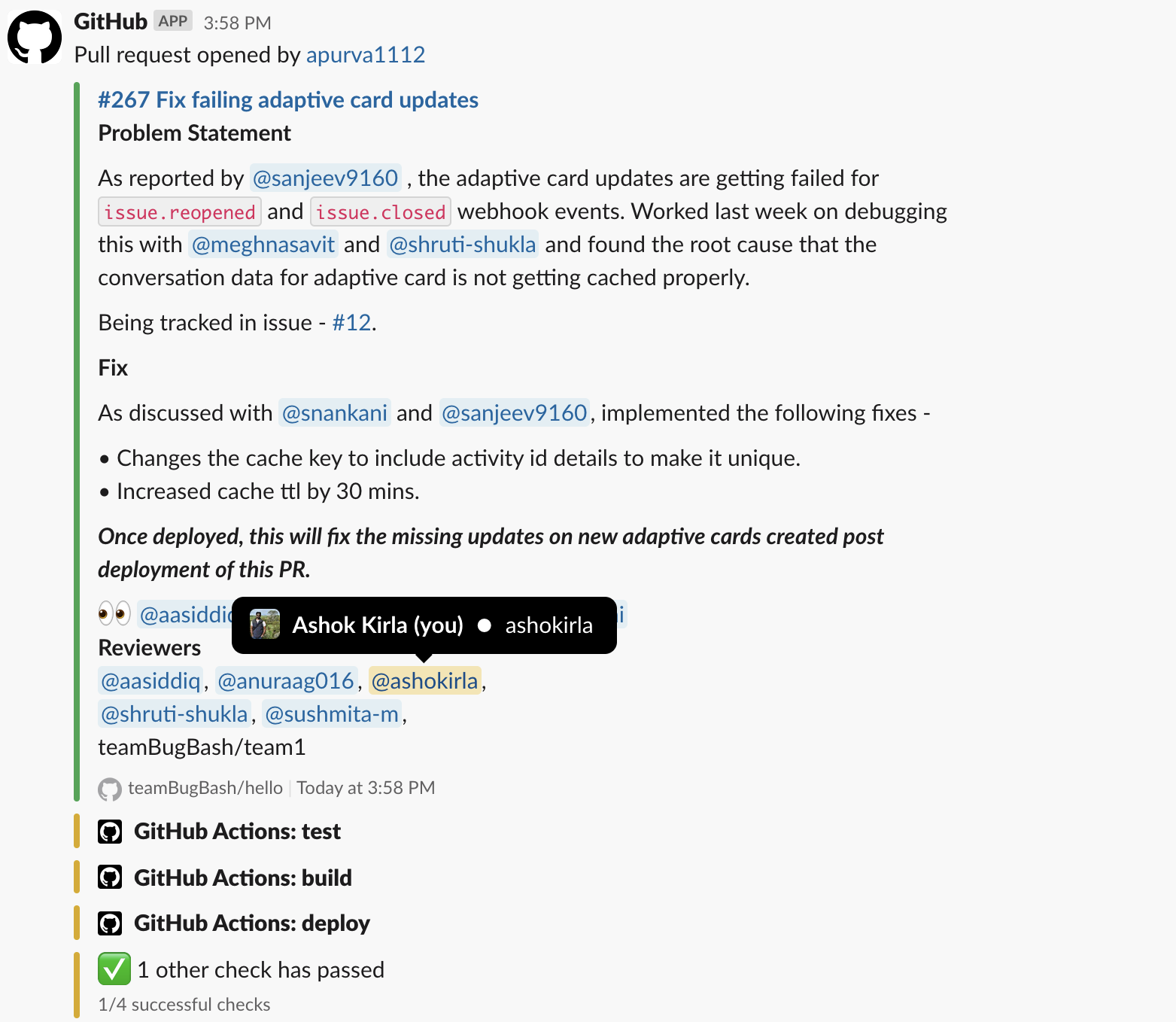
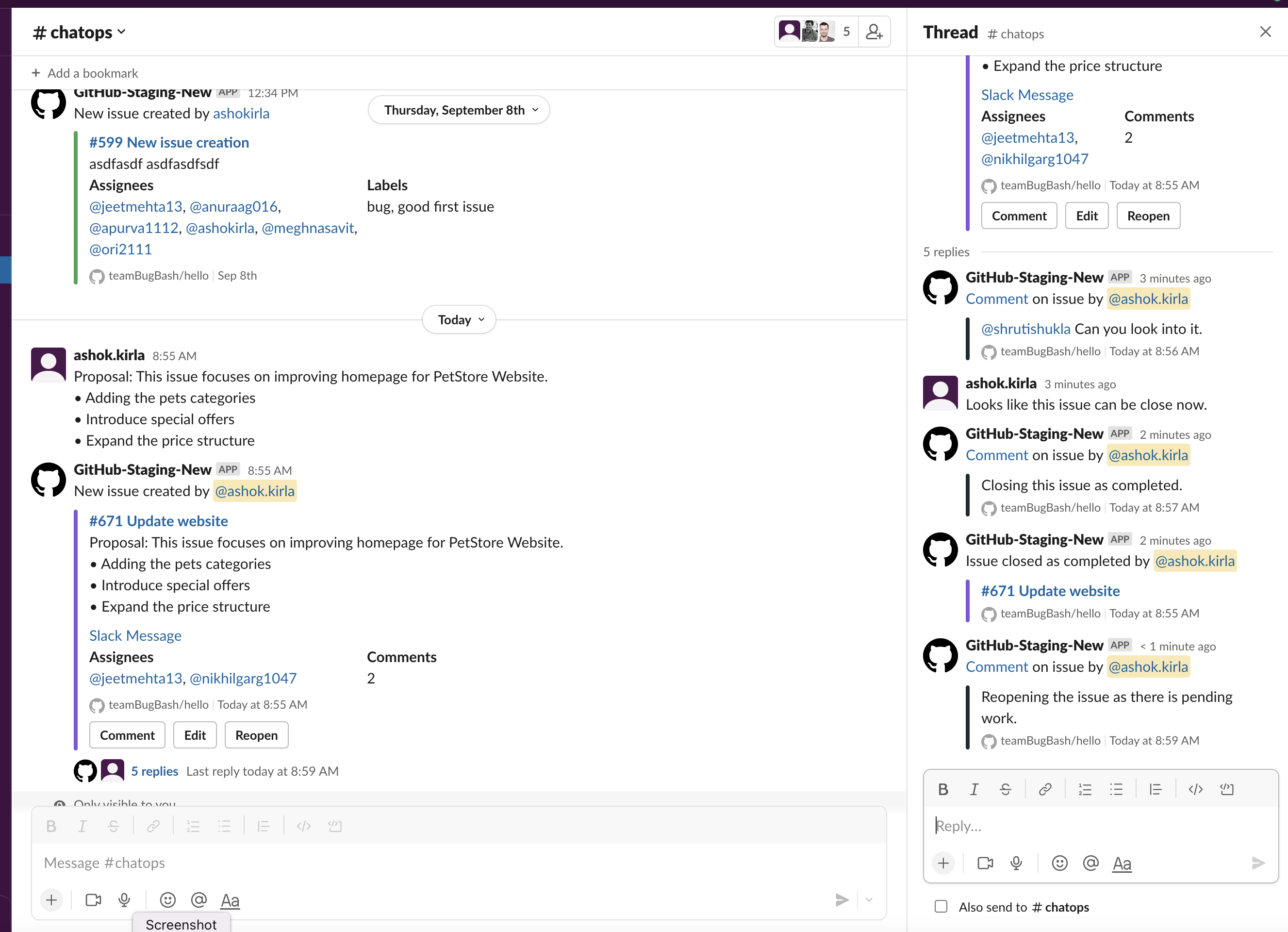
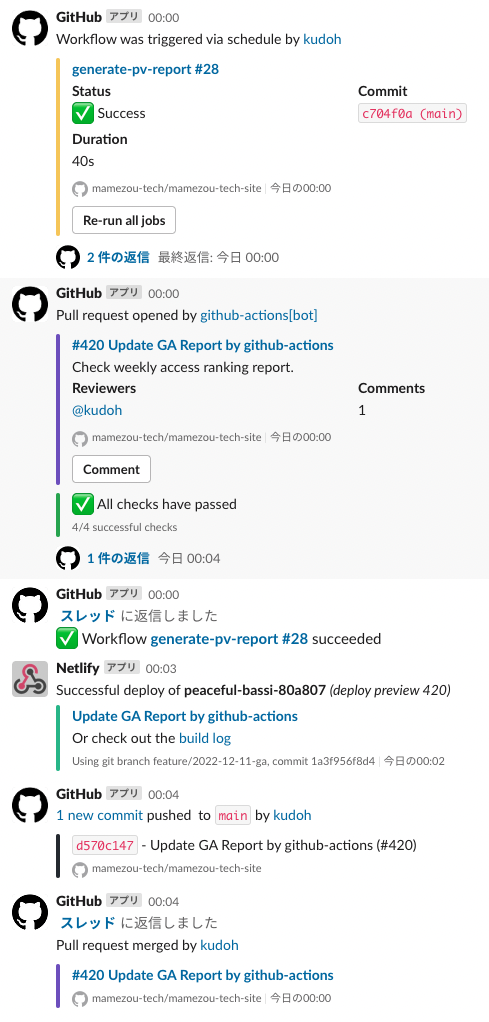
On 13 September 2026, we sent the same synthetic PR through both apps in separate private Slack channels. GitHub subscribed to pulls, reviews and comments. PullPulse used Card density, with generated GitHub comments disabled to keep the two outputs independent.
At merge, GitHub retained the original PR notification and broadcast a merge reply into the channel. PullPulse collapsed its original message to one line. Both retained the discussion thread. This describes one configured rehearsal, not a notification benchmark.
GitHub Copilot was not enabled for the test repository, so we did not compare AI answer quality. PullPulse delivered a brief, but its first diagram attempt did not pass validation. Real analysis can be incomplete; the PR page shows that status.
Historical GitHub screenshots and sources
These 2022 captures are not fresh captures or a same-PR test. The operations channel has optional workflow notifications enabled; its sixth post is from Netlify. Colors are preserved. Current GitHub behavior and UI may differ.
Before your first PR.
Start with one repository. Keep the workflow your team already knows.
Read the review workflow ↗Is PullPulse only for AI-generated PRs?
No. PullPulse helps teams review GitHub PRs whether people or agent accounts open them. It does not guess how much code was written by AI. Agent accounts have their own routing policies.
Do we still review and merge on GitHub?
Yes. Coordinate in Slack and explore the brief, diagram and evidence in PullPulse. Submit formal reviews and merge on GitHub. Picking up a review in Slack is not an approval.
Can a diagram tell us everything a change affects?
No. It helps you explore relationships and potential impact from the available source. Check the analyzed revision, coverage and source links. AI suggestions still need your judgment.
Can we start free?
Yes. The 14-day trial includes Team features without a credit card. Afterward, Free keeps routing, reminders and digests for 1 repository and up to 5 committers. AI analysis requires an active trial or paid plan and available allowance.
Compare plans and allowances ↗What happens to our code?
PullPulse reads connected repositories to build review context. Diff content is never persisted or logged; analysis results and operational records have their own retention rules.
Read the data and retention policy ↗Keep pace with the code.
Keep sight of the change.
Connect one repository and a Slack channel. Bring the next PR, its context and the people reviewing it into view.
- Connect Slack and GitHub.Choose the repositories your team reviews.
- Pick your review channel.Start with the defaults. Tune rules in App Home and
.pullpulse.yml. - Follow the next step.Pick up reviews in Slack, open the evidence and keep work moving.
Free: 1 repository · 5 committers · no card